Quantiva Trades, configurado por ti.
- Activa Quantiva Trades en TradingView
- Configura parámetros en tu propio gráfico
- Crea tu propia alerta en TradingView
- Define position size por trade (USDT)
Activa Quantiva Trades en TradingView, configura la estrategia en tu gráfico y conecta tu webhook personal solo si quieres ejecución opcional.
Quantiva conecta la estrategia en TradingView con tu webhook personal, validación de modo y workspace privado cuando decides activar ejecución.
La alerta nace en tu TradingView. El webhook de Quantiva valida payload y modo; si el modo no coincide con tu perfil, se rechaza antes de llegar al exchange.
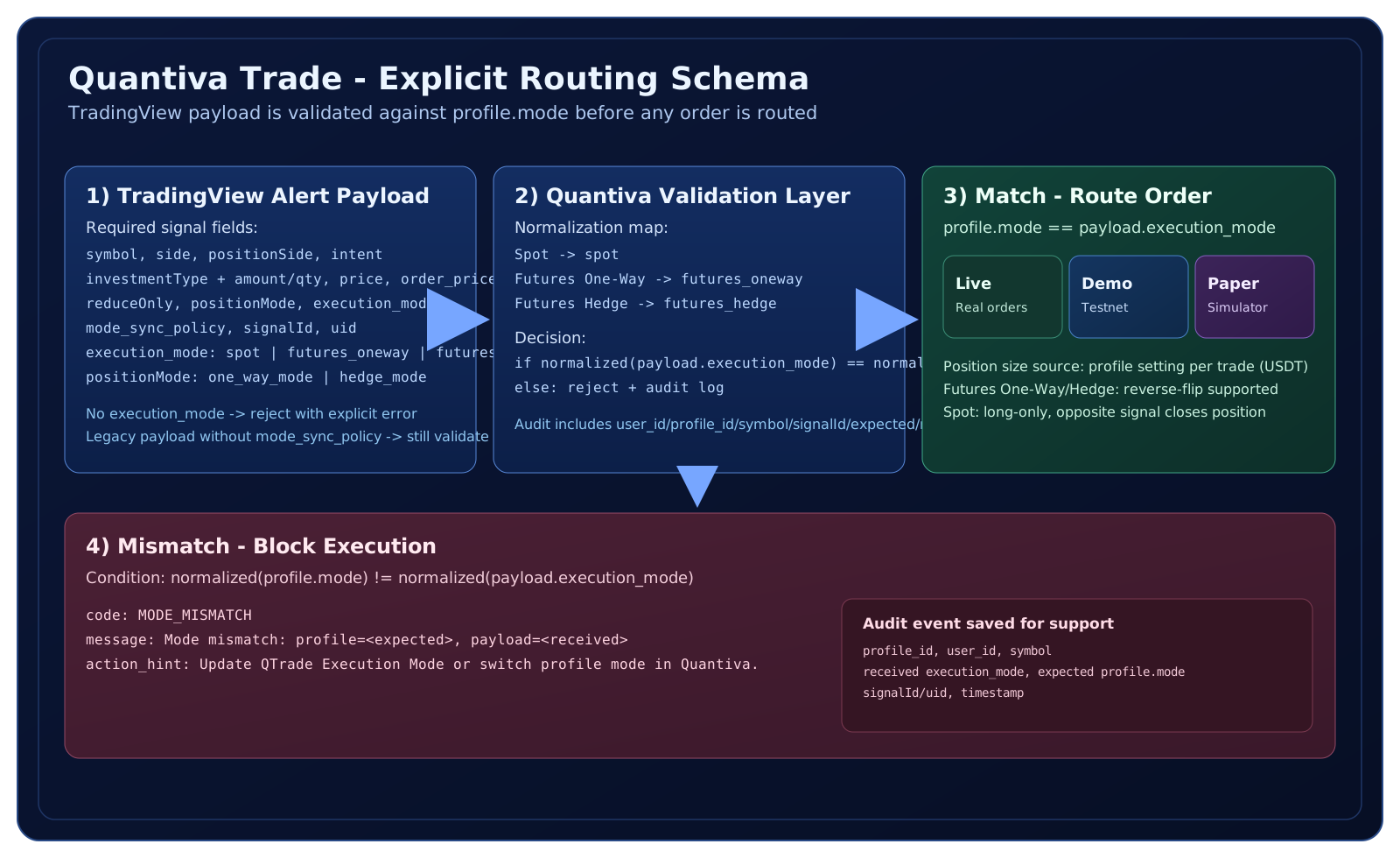
Campos mínimos requeridos por el webhook de Quantiva antes de cualquier ejecución opcional.
{
  "symbol": "BTCUSDT",
  "side": "buy",
  "positionSide": "LONG",
  "intent": "open_long",
  "investmentType": "notional_value",
  "amount": "1000",
  "price": "market",
  "order_price": "74255.20",
  "reduceOnly": false,
  "positionMode": "hedge_mode",
  "execution_mode": "futures_hedge",
  "mode_sync_policy": "required_profile_match",
  "signalId": "0",
  "uid": "UID"
}La validación se aplica siempre por seguridad, incluso con señales legacy sin mode_sync_policy.
Cuando el modo de perfil y el modo del payload difieren, se bloquea y se audita.
{
  "status": "rejected",
  "code": "MODE_MISMATCH",
  "message": "Mode mismatch: profile=futures_oneway, payload=futures_hedge",
  "action_hint": "Update QTrade Execution Mode or switch profile mode in Quantiva."
}